

CRM phone integration connects voice channels to customer records so every call becomes part of the sales or service workflow — searchable, logged, and tied to the right contact or deal. For most teams, the fastest path to full coverage is a native or pre-built connector available through your CRM's marketplace. Fall back to middleware or a custom API only when you need advanced call routing, custom telemetry, or workflows your CRM's native tools cannot handle.
Before you pick a path, audit how your team actually calls: desk phones, softphones, or mobile devices in the field. That single audit determines whether a browser extension solves your problem in a day or whether you need a cellular-aware integration that captures calls from eSIM-enabled devices on the road.
What a solid integration delivers from day one:
- Every inbound and outbound call logged automatically with duration, direction, timestamp, and agent name
- Screen pops that surface the caller's account before the rep picks up
- Click-to-dial from any CRM contact or deal record
- Call recordings linked directly to the activity record, not buried in a separate portal
- Analytics that show call volume, conversion rates, and coaching opportunities
Key Takeaways
| Point | Details |
|---|---|
| Start with native connectors | Pre-built marketplace apps deploy fastest and cover most teams' needs without custom engineering. |
| Target near-100% log rate | Manual logging captures only a typical minority percentage of calls; a properly deployed integration closes that gap. |
| Include mobile in your pilot | Field reps calling from cellular devices expose coverage gaps that desk-only pilots miss entirely. |
| Compliance is state-specific | U.S. recording consent laws vary by state; configure consent prompts per state, not globally. |
| EiSIM for field-heavy teams | EiSIM Cellular Profile Solutions captures cellular calls at the network layer, covering field devices that softphone-only connectors miss. |
Table of Contents
- What does CRM phone integration actually do for your team?
- Which technical approach fits your phone setup?
- How do you evaluate and choose the right integration?
- What does a solid implementation look like, phase by phase?
- What goes wrong, and how do you fix it?
- How EiSIM Cellular Profile Solutions integrates with your CRM
- Sources
- FAQ
What does CRM phone integration actually do for your team?
The industry term for this technology is Computer Telephony Integration (CTI) — the standard that governs how phone systems exchange data with software platforms. "CRM phone integration" is the practical, business-facing description of the same capability. Both terms appear in vendor documentation, so knowing both helps when you're reading RFP responses or developer guides.
The operational payoff is direct. Screen pops, automatic call logging, click-to-dial, and recording linkage are the four pillars every mature integration provides. Each one removes a manual step that reps currently handle inconsistently — or skip entirely when they're busy.
Manual logging is the biggest gap. Teams relying on reps to enter call notes after the fact typically capture a typical minority percentage of actual call activity in their CRM. A properly deployed integration targets near-100% call-activity coverage — meaning supervisors finally see a complete picture of what's happening on the phones, not a partial one shaped by who remembered to log.
The coverage gap matters more than most managers realize. When 40–50% of calls go unlogged, pipeline forecasts are built on incomplete data, coaching is reactive rather than proactive, and follow-up sequences break because there's no trigger to fire them.
Conversation intelligence adds another layer. AI-generated call summaries, sentiment scoring, and keyword detection sit on top of the logging layer and give managers a coaching dashboard without requiring manual call review. Start with the basics first; add intelligence once your log rate is reliable.
Embedding calling data and customer context into a single agent workspace reduces change-management friction and improves productivity from day one. Reps don't switch between a phone app and a CRM tab — the call happens inside the CRM, and the record updates automatically.
Which technical approach fits your phone setup?
Five architectures cover the vast majority of CRM telephony integration scenarios. Each trades deployment speed against customization depth.
Native / built-in dialers and marketplace apps are the fastest to deploy. Your CRM vendor or a certified partner publishes a connector in the marketplace; you install it, map your phone numbers to CRM users, and go live. Vendor-maintained means you get updates automatically, but customization is limited to what the connector exposes. This is the right starting point for most teams.
VoIP connectors and CTI adapters sit between a cloud PBX and your CRM. They handle the SIP signaling translation and expose screen-pop and logging APIs to the CRM. Common for teams already running a cloud phone system who want tighter CRM data flows without rebuilding their phone infrastructure.
Middleware and iPaaS platforms (Zapier, Make, and dedicated CTI platforms) let non-engineering teams build mid-level custom workflows — routing call events to CRM fields, triggering follow-up tasks, or syncing recordings to cloud storage. The trade-off is maintenance: every workflow you build is a workflow you own. When your phone vendor updates its API, your Zap breaks.
Custom API integrations give you full control and true two-way context sync. RingCentral's developer documentation illustrates what's possible: initiating calls from CRM records, routing by area code, and pulling full account history on inbound calls. The cost is engineering time and lifecycle ownership — someone on your team must maintain the integration as both platforms evolve.
Browser and desktop softphone extensions solve the remote and field calling problem quickly. A Chrome extension or desktop SIP client lets reps dial from any CRM record without a desk phone. The gap to watch: mobile call capture. If your field team calls from a cell number, those calls may not route through the softphone at all, leaving a logging blind spot.
A mature connector example worth studying: Exotel's Zoho CRM integration supports both PSTN and VoIP calling, click-to-call from records, automatic activity logging, inbound screen-pop, and recording playback linked to CRM activities — a useful benchmark for what a production-ready connector should cover.
| Approach | Deploy speed | Customization | Maintenance burden | Best fit |
|---|---|---|---|---|
| Native / marketplace connector | Days | Low | Vendor-managed | Most teams starting out |
| VoIP / CTI adapter | 1–2 weeks | Medium | Shared | Cloud PBX users |
| Middleware / iPaaS | 1–3 weeks | Medium | Team-owned | Non-engineering teams needing custom flows |
| Custom API integration | 4–12 weeks | High | Engineering-owned | Complex routing or unique data requirements |
| Browser / softphone extension | Hours to days | Low | Vendor-managed | Remote desk workers; limited mobile coverage |
How do you evaluate and choose the right integration?
Picking the right integration is less about features and more about fit. Run through these criteria before you commit to a vendor or architecture.
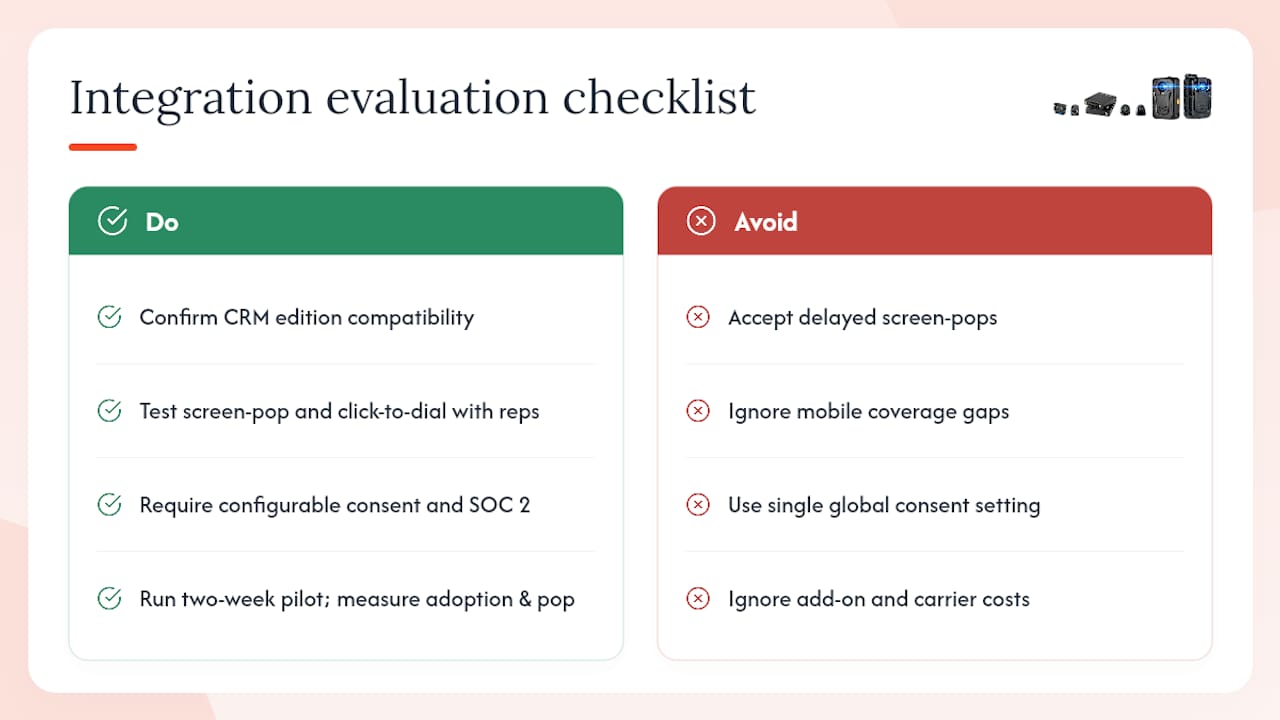
Compatibility matrix. Confirm which CRM editions the connector supports — some features are gated to enterprise tiers. Check whether data flows bidirectionally: the CRM should push context to the phone system (account ownership, deal stage) and the phone system should push call data back (duration, recording, disposition). Verify mobile coverage explicitly; many connectors log desk and softphone calls but miss cellular.
Adoption and UX. Screen-pop reliability is the adoption killer nobody talks about. If the pop fires two seconds after the rep answers, it's useless. Test click-to-dial ergonomics with actual reps, not just IT. The admin console should let a non-developer configure field mappings and call routing without opening a support ticket.
Reporting and coaching. Call-center integrations that embed voice in the agent workspace allow supervisors to view cross-channel context and improve onboarding and coaching. Ask vendors specifically: can a supervisor pull a call transcript, listen to a recording, and leave a coaching note — all from inside the CRM? If the answer requires three separate tools, that's a red flag.
Security and compliance. U.S. recording law is a patchwork. Federal law (the Electronic Communications Privacy Act) requires one-party consent, but states like California, Florida, and Illinois require all-party consent. Your integration must support configurable consent prompts by state, not a single global setting. Confirm SOC 2 Type II certification for any vendor storing recordings, and review data retention controls against your industry's requirements (HIPAA, PCI DSS, FINRA).
Pricing shape. Most integrations charge per user per month, but add-ons for AI transcription, analytics dashboards, and extended recording storage can double the effective cost. Model total cost of ownership across 12 months, including carrier fees and any professional services for setup.
Support and SLAs. Ask for the median time-to-resolution for P1 issues and whether onboarding includes a dedicated implementation engineer or just documentation.
Pro Tip: Run a two-week pilot with a mix of power users and field agents. Measure two things: adoption rate (what percentage of calls are auto-logged) and screen-pop reliability (does context appear before the rep answers). Those two metrics predict long-term success better than any feature checklist.
Trust signals to request from vendors: reference customers in your industry, documented implementation timelines, and sample ROI metrics showing CRM log-rate improvement post-deployment.
What does a solid implementation look like, phase by phase?
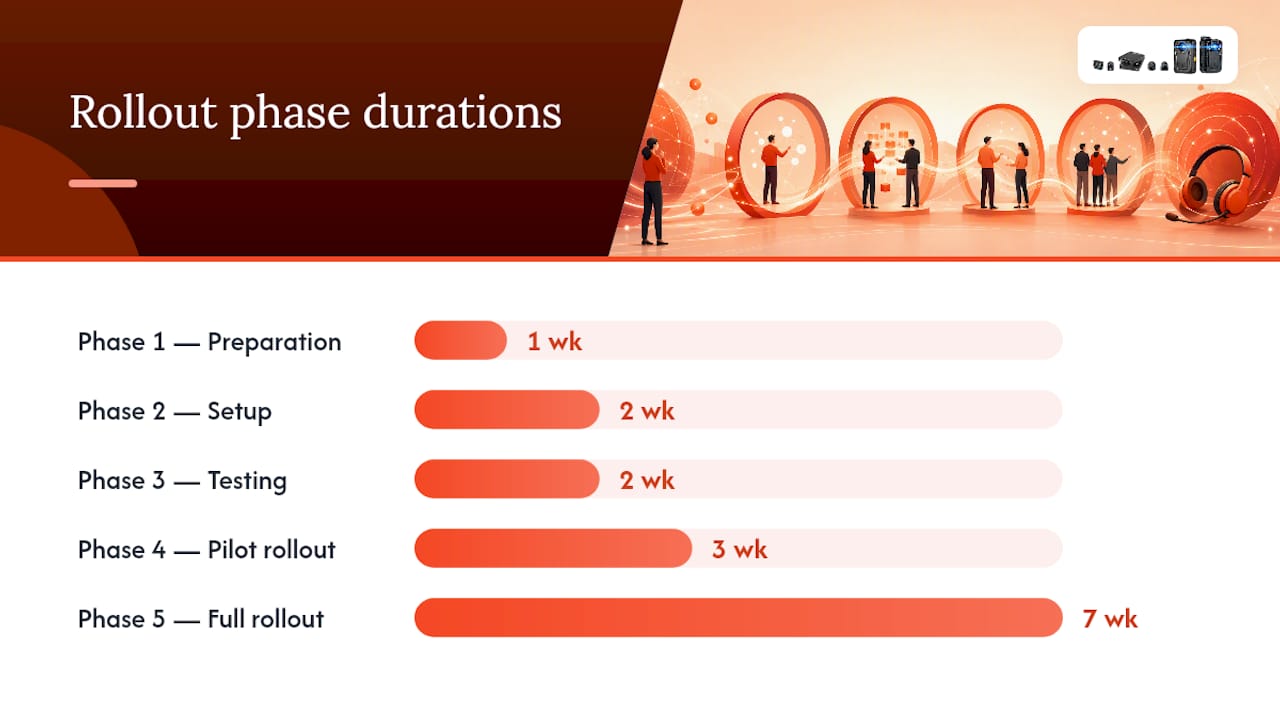
A phased rollout protects you from the most common failure mode: going live with a half-configured integration and then spending weeks firefighting sync errors.
Phase 1: Preparation (Week 1)
- Inventory all calling surfaces: desk phones, softphones, mobile numbers, and field devices
- List every CRM module the integration must touch (contacts, deals, accounts, service tickets)
- Identify compliance requirements by state and industry
- Assign an integration owner and a CRM admin as the two accountable roles
Phase 2: Setup (Weeks 2–3)
- Install the connector or configure the CTI adapter
- Map phone numbers and extensions to CRM user records
- Configure screen-pop templates, call logging field mappings, and recording storage location
- Set up consent prompts for states requiring all-party notification
Phase 3: Testing (Week 3–4)
- Run QA scripts covering inbound, outbound, transferred, and missed calls
- Test deduplication: call the same number twice and confirm one activity record, not two
- Validate mobile call capture by placing test calls from field devices
- Confirm recordings attach to the correct CRM activity and are accessible to supervisors
Phase 4: Pilot rollout (Weeks 4–6)
- Deploy to a pilot group of 5–10 reps covering both desk and field calling patterns
- Measure CRM log rate daily; target near-100% coverage against the typical minority percentage baseline typical of manual logging
- Collect adoption friction points and fix configuration issues before expanding
Phase 5: Full rollout (Weeks 6–12)
- Expand department by department, not all at once
- Run a 30-minute training session per team focused on screen-pop workflow and click-to-dial
- Set a go-live date for mandatory logging enforcement and communicate it two weeks in advance
Typical cost levers to budget:
- Per-user license: varies by connector tier and CRM edition
- Per-minute or trunk charges: applies to VoIP and PSTN connectors
- Professional services: setup and configuration assistance, typically a one-time fee
- Storage and retention: recording storage costs scale with call volume and retention period
| Setup task | Responsible role | Typical duration |
|---|---|---|
| Phone inventory and compliance mapping | IT / Operations | 2–3 days |
| Connector installation and user mapping | CRM Admin | 1–2 days |
| Screen-pop and logging configuration | CRM Admin | 1–2 days |
| QA testing (inbound, outbound, mobile) | IT + Pilot reps | 3–5 days |
| Pilot group rollout and measurement | Team Lead + IT | 2 weeks |
| Full department rollout | IT + Team Leads | 4 weeks |
What goes wrong, and how do you fix it?
Most integration failures trace back to a small set of recurring problems. Knowing them in advance cuts troubleshooting time significantly.
Duplicate call records. The most common issue after go-live. Usually caused by both the connector and a manual-logging habit firing simultaneously. Fix: disable manual call logging fields for integrated users and configure the connector's deduplication rules to match on phone number plus timestamp within a 60-second window.
One-way integrations that miss CRM context. Some connectors log calls to the CRM but never pull CRM data into the phone interface. The rep gets no screen pop, no account history, no deal stage. This cuts the integration's value roughly in half. Test for bidirectional sync before you sign a contract: place an inbound call from a number tied to a known CRM contact and confirm the pop fires with the right record.
Mobile call coverage gaps. Field reps calling from a personal or company cell number bypass the softphone entirely. Those calls never reach the connector's logging layer. Solutions include routing field calls through a cloud bridge, using a mobile app version of the softphone, or deploying a cellular profile that routes calls through the integration layer regardless of device. This last option is where cellular-aware integrations have a clear advantage over desk-only connectors.
Over-engineering from day one. Teams that start with AI transcription, complex routing rules, and custom disposition workflows before basic logging works reliably create noise faster than value. Start with screen pop, auto logging, and click-to-dial. Measure log rate. Then add layers.
Recording compliance traps. A single global "recording on" setting is a liability in multi-state U.S. deployments. Configure consent prompts by state, store recordings in a SOC 2-certified environment, and set retention policies that match your industry's requirements. Review EiSIM's privacy and data handling policies as a reference for how a compliant data configuration should be documented.
- Gather connector logs, CRM sync logs, and phone system event logs before contacting support
- Reproduce the issue with a test call before escalating — support teams resolve issues faster with a reproducible case
- Keep a rollback plan: document the pre-integration state so you can revert field mappings without losing historical data
Pro Tip: Enable a separate logging sandbox environment to validate new workflow triggers before applying them to production. A trigger that fires correctly in staging but duplicates records in production is a common and avoidable mistake.
How EiSIM Cellular Profile Solutions integrates with your CRM
EiSIM Cellular Profile Solutions is built for teams where the phone is a field device, not a desk instrument. Its Cellular Profile Solution captures voice activity at the cellular layer, which means calls from eSIM-enabled devices log to your CRM whether the rep is in the office, on a job site, or in an area with intermittent connectivity.
Core integration capabilities:
- Automatic call logging tied to CRM contacts and deals, including calls placed from mobile devices
- Screen-pop delivery to the rep's CRM interface on inbound calls
- Recording linkage with secure cloud storage, configurable retention, and access controls
- Offline and edge sync for field teams operating in low-connectivity environments
Why field-heavy teams choose EiSIM:
- eSIM provisioning eliminates the hardware dependency that breaks most softphone-only deployments
- A single vendor covers cellular profile, CRM connector, VPN, and cloud storage — fewer integration points to maintain and a single support escalation path
- The Telecom Academy gives your team structured training on integration setup, compliance configuration, and adoption best practices
EiSIM Cellular Profile Solutions reduces vendor sprawl for field operations teams by consolidating cellular service, CRM call capture, secure storage, and VPN into one managed platform — so your IT team maintains one relationship instead of four.
Pro Tip: When evaluating EiSIM for your team, ask specifically about eSIM provisioning timelines and how the Cellular Profile Solution handles call capture in areas with intermittent LTE coverage. Those two questions separate EiSIM from desk-only connectors faster than any feature sheet.
What the EiSIM Telecom team has learned from real deployments
Three lessons come up consistently across deployments, and they apply whether you're running EiSIM or any other integration.
Pilot small and measure log rate first. A pilot group of 5–10 reps tells you more in two weeks than a full rollout tells you in two months. The KPI that matters most in week one is CRM log rate, not feature adoption.
Force mobile coverage into scope from day one. Teams that pilot with desk users and then expand to field reps almost always discover a mobile coverage gap at the worst possible time. Include at least two field reps in every pilot group.
Change management is the hardest part. Reps who've been manually logging calls for years often resist automation because they lose visibility into what's being captured. Show them the activity feed in real time during training. When they see their calls appearing automatically, adoption accelerates.
KPIs to track from week one: CRM log rate, screen-pop delivery rate, click-to-dial usage, and call-to-follow-up conversion rate.
EiSIM Cellular Profile Solutions supports your CRM integration from day one
Field teams and operations managers who need reliable CRM call capture without managing four separate vendors have a direct path with EiSIM Cellular Profile Solutions. The Cellular Profile Solution bundles eSIM provisioning, CRM call logging, secure cloud storage, and VPN into a single subscription — with Telecom Academy training included so your team gets up to speed without a lengthy onboarding engagement.
Pilot programs are available for teams ready to test mobile-first CRM call capture before committing to a full rollout. Onboarding typically runs two to four weeks depending on the number of CRM modules and field devices in scope. EiSIM's implementation team handles connector configuration, user mapping, and compliance setup — so your IT team focuses on validation, not build.
Explore EiSIM's cellular bundles to see which plan fits your team size and calling volume, or visit Eisim to start a pilot evaluation.
Sources
These resources support RFP writing, developer configuration, and vendor evaluation for CRM telephony integration.
For technical and IT teams:
- Business Phone Solutions | CRM Phone Integration
- Call Centre Integration Software & Cloud Telephony Solutions | Salesforce EU
For operations and procurement teams:
FAQ
Can I use CRM on my phone?
Yes. Most modern CRM platforms offer mobile apps, and many CRM phone integrations support mobile call capture through softphone apps or cellular-layer connectors. Field teams using eSIM-enabled devices can log calls automatically without a desk phone.
What is an example of CRM integration?
A sales rep clicks a contact record in their CRM, dials with one click, and the system automatically logs the call duration, direction, and outcome — then attaches the recording to the activity record. Exotel's Zoho CRM connector is a documented example that covers exactly this workflow for both PSTN and VoIP calls.
What are the 4 types of CRM?
The four commonly recognized CRM types are operational (automating sales, marketing, and service processes), analytical (reporting and data analysis), collaborative (sharing customer data across teams), and strategic (long-term customer relationship planning). CRM phone integration primarily enhances operational CRMs by automating call logging and follow-up.
Which CRM is best for call centers?
The best CRM for a call center depends on call volume, channel mix, and whether you need embedded CTI or a separate contact center platform. Evaluation criteria should include screen-pop reliability, supervisor coaching tools, cross-channel context, and recording compliance controls. EiSIM Cellular Profile Solutions is a strong fit for field-based call operations that need cellular-layer call capture alongside CRM logging.